
With Ohio State's support and approval, we’d like to inform you of an upcoming update to the parking system.
What's changing
-
Beginning with the 2026-27 permit year that starts on August 1, parking permits will transition to one active license plate linked to your permit
-
Multiple license plates can still be stored on your parking account; however, one license plate can only be active on your permit when parking on campus
-
CampusParc will begin enforcing this operational change on the first day of the Spring semester on January 11, 2027
Why it matters:
-
This change improves transparency across our parking system, helps reduce citations issued in error, and ensures more accurate permit enforcement
What you need to do
-
The latest updates to the My Account dashboard make for an easy selection, addition or subtraction of license plates linked to your parking permit
-
If you currently have multiple vehicles on your permit, review your vehicle information prior to January 11, 2027, to ensure compliance with this new operational change
-
If you do not decide which license plate to remove, the license plate that was linked most recently will remain on the permit
-
-
If multiple plates were linked at the same time, the plate to remove will be randomly selected
-
Instructions to attach your vehicle to your permit:
-
Log in to your account at osu.campusparc.com and select My Account
-
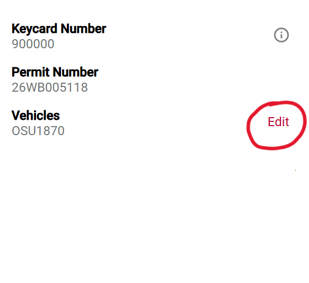
Under Welcome, [Name], locate My Parking QR Code and Vehicles, and click Edit next to Vehicles
-
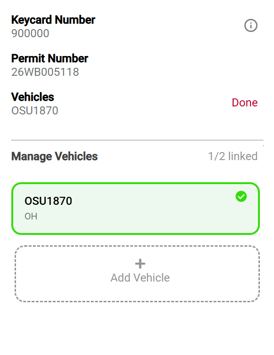
Review your vehicle(s). From this page, you can add, edit, or remove vehicles
-
Look for the green highlight. A vehicle highlighted in green is successfully linked to your permit and account
Contact information
Why it matters: Keeping your contact information current ensures you receive important parking updates and notifications about permit impacts
Instructions to update your contact information:
-
Log in to your account at osu.campusparc.com and select My Account
-
Under Welcome, [Name], click Edit next to your Username, Address, or Primary Email
-
Save any changes
Medical Center employees
-
If you don't regularly check your Ohio State name.#@osu.edu email account, we recommend forwarding those emails to your OSUMC account
-
Your parking account uses your Ohio State email as the primary contact for parking communications
Access keycard
-
Good news: Your keycard is reusable each year as long as you have an active permit
-
Need a replacement? Contact Customer Care at 614-688-0000 or osuinfo@campusparc.com, or visit the Customer Care Center at 1560 N. High St., located in the Gateway Plaza
Digital QR code
-
No keycard? No problem. Your digital QR code is available anytime in your parking account
-
If your permit includes garage or event access:
-
-
Log in to your parking profile
-
-
-
Open your QR code on your smartphone
-
-
-
Scan it at the garage or event entrance
-
Tip: If scanning is difficult, increase your phone’s screen brightness
Keeping your parking account up to date ensures smooth access to parking facilities and uninterrupted communication from CampusParc. You can also view your permit information anytime in the Ohio State App
For parking updates, follow us on social media. Unsure where to park with your permit? Check out the SureParc app on our website.